Digital Patient Intake Forms That Send Structured Data to Your EHR
Replace PDFs and manual re-entry with custom, mobile-friendly patient forms built around your clinical workflow. Patients complete forms without an app or account, and PatientLink maps their responses to the right EHR fields and other configured destinations.
Connected workflowStructured EHR dataMapped where it belongs
26+ yearsworking with EHR data and clinical workflows
10-15 minper-patient time savings reported by 54% of respondents in a 2026 PatientLink customer survey*
6-12 weekstypical Online implementation, depending on complexity
No long-term contractsflexible partnership without a long commitment
*PatientLink customer time-savings survey, 2026; 28 respondents. Survey result reflects PatientLink workflows generally and is not specific to PatientLink Online.
More Than a Web Form
A Digital Form Is Only Half the Solution
Getting a patient to complete a form is easy. Getting that information into the right places in the clinical workflow is harder. PatientLink Online is built around the data behind the form, not just the form on the screen.
Typical online form workflow
The form becomes another document
Patient submits→PDF or inbox→Staff reviews→Manual re-entry
Important answers may still need to be opened, interpreted, copied, and entered into the EHR by staff.
PatientLink Online
The form becomes usable clinical information
Patient submits→Validate + score + map→Discrete EHR data
Responses can be transformed and routed to mapped EHR fields and, when configured, to chart documents, research databases, registries, or multiple destinations.
Simple for Patients. Powerful Behind the Scenes.
How PatientLink Online Works
Use Online independently, alongside PatientLink 360, or with another patient engagement platform.
1
↗
Give the patient access
Place a link on your website, send it by email or text, embed it in a portal, or share it with a QR code.
2
✓
The patient completes the form
No app. No account. Patients can use a phone, tablet, desktop computer, or kiosk with a responsive experience.
3
⇄
PatientLink sends data where it belongs
Configured logic can validate, score, transform, and map responses into the appropriate clinical or research workflow.
Structured EHR Data
Put Patient Answers Into the Fields Your Team Actually Uses
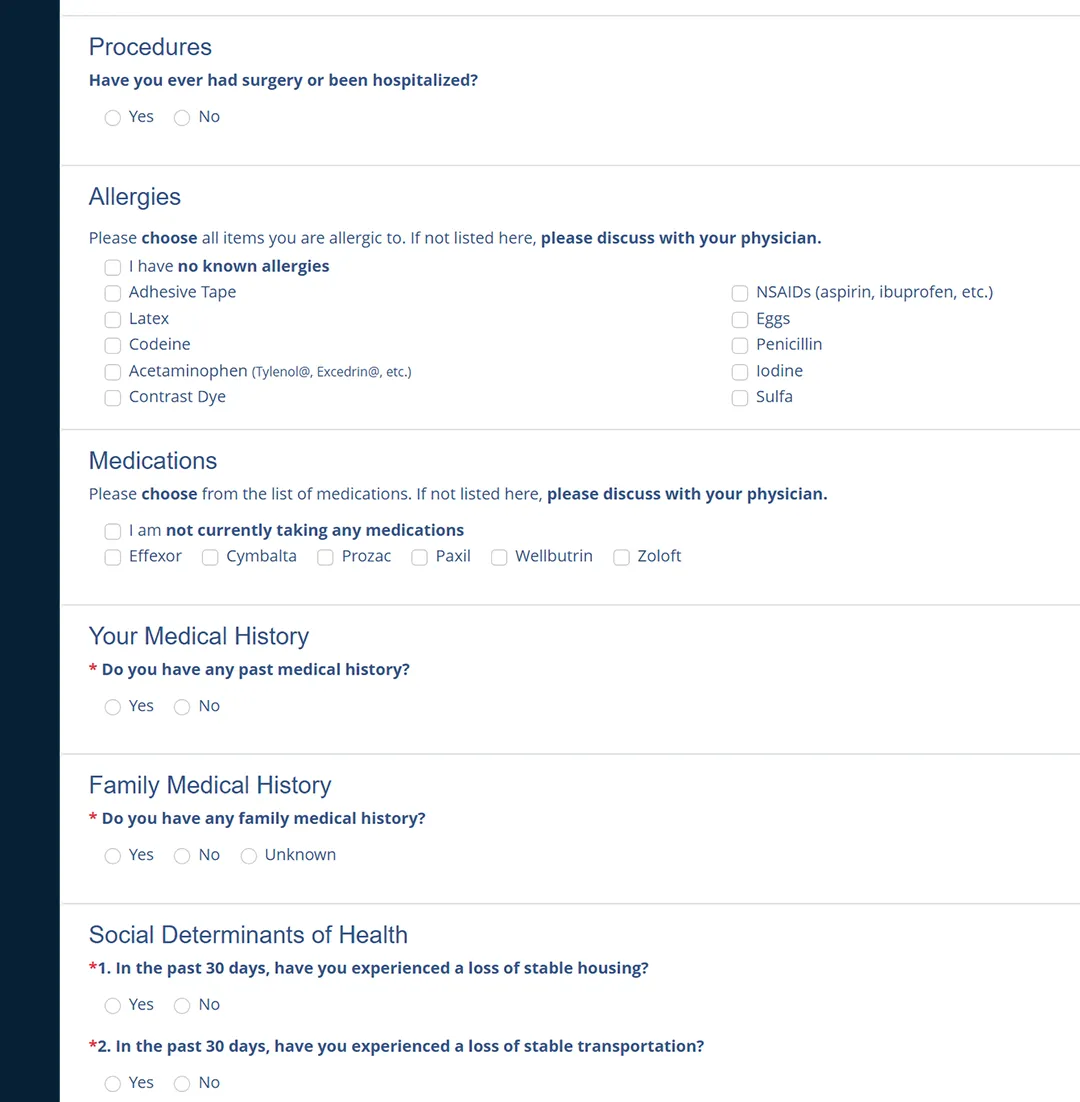
PatientLink is designed to map patient-reported information using the data types and field mappings required by the connected workflow. That means important clinical information does not have to stay trapped inside a PDF.
AllergyPenicillin
Smoking StatusNever
SDOH - HousingNo instability reported
MedicationZoloft
Illustrative example only. Actual mapping and destinations are configured around the connected EHR, form, and customer workflow.
More Than Fields on a Screen
Intelligent Forms Built for Clinical Workflows
Build patient forms around the information you actually need, then apply logic and processing before the data reaches its destination.
◇
Conditional Logic
Show follow-up questions when they are relevant and skip sections that do not apply.
#
Automatic Scoring
Process supported assessments and calculate configured scores without asking staff to score them manually.
!
Clinical Alerts
Trigger configured alerts when patient responses or calculated results meet clinic-defined criteria.
✎
Consent & E-Signatures
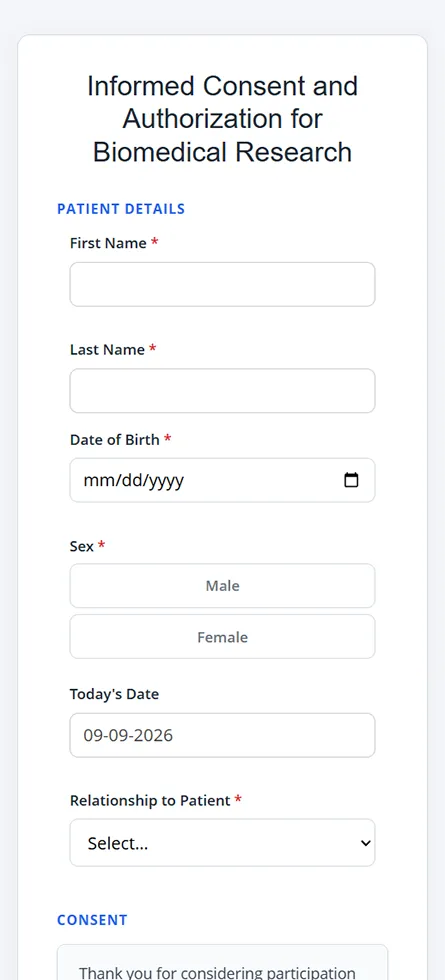
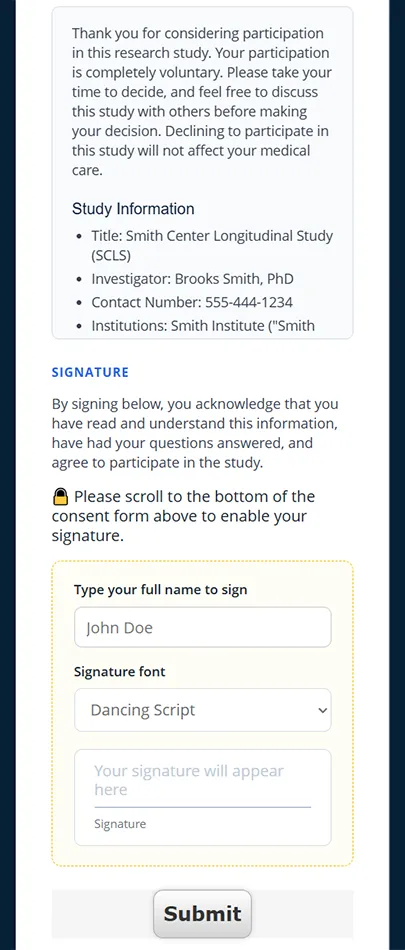
Collect acknowledgments, typed signatures, initials, and other configured consent information electronically.
✓
Validation & Required Fields
Use required responses, validation rules, calculated fields, prefilled information, and other controls to improve data quality.
↑
Uploads & Flexible Inputs
Support checkboxes, radio buttons, dropdowns, free text, dates, document or photo uploads, and other patient inputs.
Assessments & Screenings
Assessments That Do More Than Collect Answers
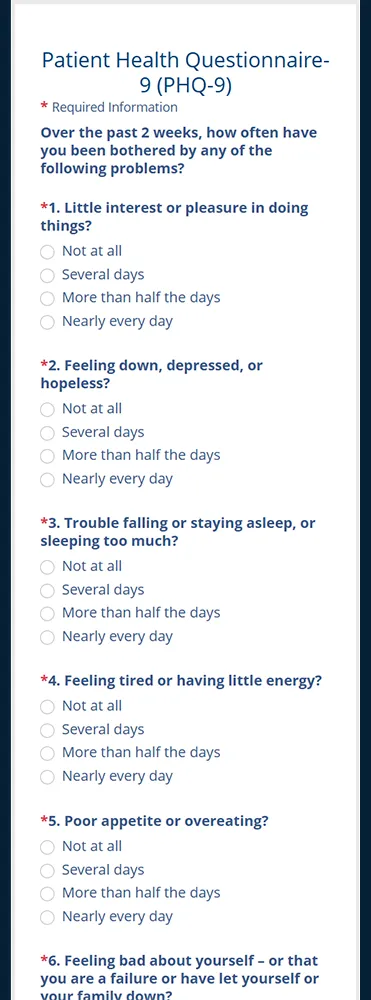
PatientLink's processing engine can score supported assessments, transform results, and send configured outputs into the clinical workflow. Individual responses, totals, interpretations, and alerts can be handled according to the needs of the organization and connected system.
Automatic scoringBranching logicThreshold alertsDiscrete data
Easy to Open. Easy to Complete. No New Account to Manage.
Patients can complete PatientLink Online forms from home or in the clinic without downloading an app or creating a PatientLink account.
Responsive on phones, tablets, desktops, and kiosks
Patient data is encrypted in transit and at rest
Forms can be linked from a website, portal, email, text message, or QR code
English, Spanish, Arabic, Vietnamese, and additional languages can be supported
Forms are built and tested to meet WCAG standards
Clinic branding can be incorporated while PatientLink branding stays minimal
Designed Around Real Clinical Work
Your Forms. Built the Right Way.
Send us the forms and workflows you already use. PatientLink's team builds and configures the digital experience, including questions, logic, scoring, branding, EHR mapping, and supported data destinations.
Clinical Intake
Patient History & SDOH
Capture histories, medications, allergies, social information, SDOH, review of systems, and other patient-reported clinical data.
Consent & Research
Electronic Consent & Signature
Digitize consent, authorization, research, acknowledgment, and signature workflows without reducing them to an unstructured PDF process.
Assessments
Scored Screenings
Collect supported assessments, calculate scores, and route configured results, responses, or alerts to the appropriate destination.
Clinical Intake
Comprehensive medical history
Review of Systems
Medication and allergy information
Specialty-specific intake
Assessments & Screenings
PHQ-9 and GAD-7
SDOH
Alcohol and drug risk
Fall risk
Wellness & Experience
Medicare Annual Wellness
Patient satisfaction
Quality workflows
Patient-reported outcomes
Consent & Research
Electronic consent
HIPAA acknowledgments
Research questionnaires
Custom structured data collection
EHR Integration & Interoperability
Designed Around Your Existing EHR Workflow
PatientLink has deep experience with ambulatory EHR data and can work with your team to configure the form, mapping, and routing approach that fits your environment. Integration is more than moving a completed document: supported patient responses can be transformed into the fields, formats, and data types your connected workflow requires.
Built for the data exchange your EHR requires. PatientLink supports HL7 v2, FHIR, proprietary APIs, flat files, and custom database interfaces. Strong Online integrations include Veradigm, Altera, and athenahealth. Integration availability and capabilities vary by EHR, version, interface, and customer configuration.
Flexible Data Routing
One Patient Submission. Multiple Possible Destinations.
PatientLink Online can transform patient-reported information into the structured output your workflow requires.
PatientOnline Form
→
PatientLinkValidate · Score · Transform · Map
→
EHR fieldsChart PDFResearch databaseRegistryOther configured systems
Choose the Workflow That Fits
One PatientLink Platform. The Workflow That Fits Your Practice.
PatientLink Online, PatientLink 360, and PatientLink Scan can stand alone or work together to give organizations more flexibility in how they collect and use patient information.
This product
PatientLink Online
Best when you need flexible digital clinical forms and structured data collection without a full appointment-driven check-in workflow.
Digital clinical forms
No patient app or account
Discrete EHR data mapping
Can work with other engagement platforms
Full digital check-in
PatientLink 360
Adds appointment-driven communications and broader check-in workflows around PatientLink's digital form capabilities.
Send Us Your Forms. We Handle the Build and Mapping.
Clinical data deserves more than a trial-and-error DIY form builder. PatientLink's team works with your organization to build the form experience and connect the resulting data to the workflow you need.
01Review forms & workflow
Start with existing forms, requirements, clinical logic, and desired destinations.
02Build & map
PatientLink configures the digital forms, logic, scoring, branding, and supported mappings.
03Customer testing
Your team validates the patient experience, data flow, and workflow before launch.
04Train & go live
PatientLink supports implementation and helps your team move into production.
Typical implementation: approximately 6-12 weeks, depending on form, integration, and workflow complexity.
Frequently Asked Questions
Questions About Digital Patient Intake Forms
What is PatientLink Online?
PatientLink Online is PatientLink's digital clinical forms product. It allows patients to complete online intake forms, assessments, consents, and other questionnaires while PatientLink transforms the resulting information for configured EHR, research, registry, document, or other data workflows.
Do patients need an app or PatientLink account?
No. Patients can open a PatientLink Online form in a supported web browser without downloading an app or creating a PatientLink account.
How can patients access an Online form?
A clinic can place the form link on its website, send the link by email or text, embed it in an existing portal, or share it by QR code. Automated appointment-driven sending is available through PatientLink 360.
Does PatientLink Online send information into discrete EHR fields?
Yes. PatientLink Online is designed to map supported patient responses into the appropriate EHR fields using the configured data types and mappings instead of relying only on a completed document.
Can a completed PDF also be attached to the chart?
Yes. When configured, PatientLink can create a completed document for the chart while also sending supported information as structured data.
Can PatientLink Online score assessments and trigger alerts?
Yes. Supported assessments can be processed through PatientLink's scoring engine, and forms can trigger configured alerts based on clinic-defined rules and thresholds.
Can PatientLink recreate our existing forms?
In most cases, yes. PatientLink can work from your existing forms and configure the digital experience around your questions, branding, logic, scoring, and supported destinations. Copyright-protected instruments require appropriate permission from the copyright owner.
What languages and devices are supported?
PatientLink Online forms can be used on phones, tablets, desktop computers, and kiosks. English, Spanish, Arabic, Vietnamese, and additional languages can be supported. Forms are built and tested to meet WCAG standards.
How does PatientLink Online protect patient data?
Patient data is encrypted in transit and at rest to help protect sensitive information as it moves through and is stored within the PatientLink Online workflow.
Which EHRs can PatientLink Online integrate with?
PatientLink has strong Online integrations with Veradigm, Altera, and athenahealth and can support additional environments through HL7 v2, FHIR, proprietary APIs, flat files, and custom database interfaces. Availability varies by EHR, version, interface, and customer configuration.
How long does PatientLink Online implementation take?
A typical implementation is approximately 6-12 weeks, depending on form complexity, EHR mapping, integration requirements, testing, and the overall workflow.
See PatientLink Online in Action
See What Happens After the Patient Clicks Submit
Show us the forms you use today and the EHR workflow you want to improve. We will walk through how PatientLink Online can turn patient responses into structured, usable data while reducing manual work for staff.
No long-term contracts
Demo tailored to your forms and EHR
See digital intake, scoring, mapping, and routing
Request a Personalized Demo
Complete the form and a PatientLink team member will contact you to learn about your workflow and arrange a convenient time.
We use cookies on our website to give you the most relevant experience by remembering your preferences and repeat visits. By clicking “Accept”, you consent to the use of cookies.