Annual and Preventive Care
Encourage patients to return for annual physicals, wellness visits, and routine preventive care.

Bring patients back when follow-up care is due - without relying on spreadsheets, manual reports, or repeated phone calls.
PatientLink identifies patients who are approaching or past their recommended return date, sends personalized text and email reminders, and completes the recall when an appointment is scheduled.
Keeping patients on schedule for follow-up care can require hours of administrative work. Staff may need to run reports, review spreadsheets, place repeated phone calls, and manually track which patients have scheduled.
PatientLink Recall Reminders gives your practice a structured way to identify patients who need to return, communicate with them automatically, and monitor their progress from one centralized workflow.
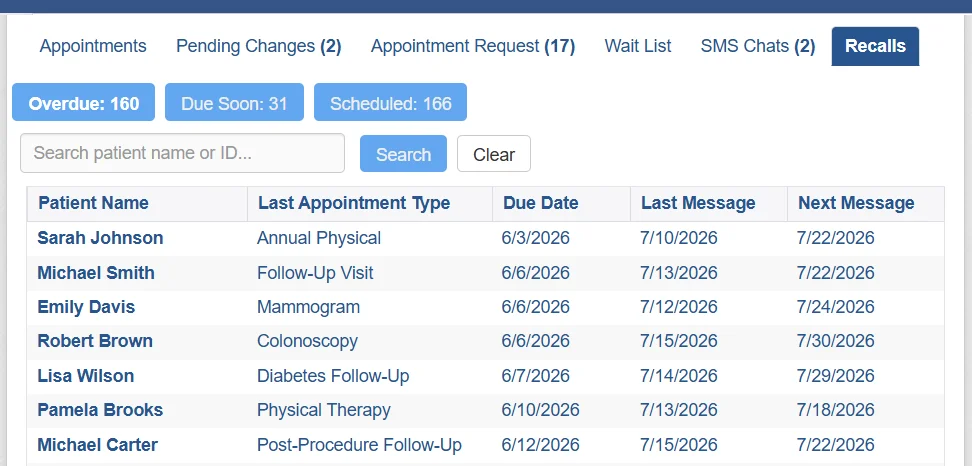
PatientLink manages the recall process from the recommended return date through appointment scheduling—helping your staff reach the right patients without maintaining manual call lists.
Define when patients should return and configure the timing, frequency, message limits, and completion criteria for each type of follow-up care.
PatientLink identifies patients who are due soon or overdue based on the return schedule established by your practice.
Personalized text and email reminders are sent according to your schedule and the type of follow-up care the patient needs.
PatientLink monitors available appointment information and recognizes when a qualifying follow-up appointment has been scheduled.
The recall is completed automatically and additional reminders stop, allowing staff to focus on patients who still need help.
One connected workflow: PatientLink helps your team identify, contact, track, and complete patient recalls without relying on disconnected spreadsheets and manual reconciliation.
Different types of care require different follow-up schedules. PatientLink allows your practice to create recall workflows based on the service, appointment type, and recommended return interval.
Encourage patients to return for annual physicals, wellness visits, and routine preventive care.
Help patients stay connected to recurring visits related to diabetes, hypertension, and other ongoing conditions.
Create return schedules for specialty visits that should occur several weeks, months, or years later.
Remind patients when it is time to schedule a recommended follow-up after a procedure or treatment.
Support recurring wellness visits, developmental follow-ups, and other age-based care schedules.
Contact patients who need to return for therapy, rehabilitation, injections, or treatment reviews.
Reach patients who are due for mammograms, colonoscopies, and other recommended screenings.
Configure recall schedules for any recurring service or clinical workflow supported by your practice.
Configure each workflow separately. Recall timing, reminder frequency, communication templates, and appointment-completion rules can be tailored to the type of care.
Both types of reminders support patient engagement, but they are used at different stages of the scheduling process.
Recall reminders contact patients who are approaching or have passed a recommended return date but do not yet have the appropriate appointment scheduled.
“You are due for your annual follow-up appointment. Please contact our office to schedule.”
Appointment reminders contact patients after an appointment has already been scheduled and provide information about an upcoming visit.
“This is a reminder of your appointment on June 3 at 9:30 AM. Please arrive 15 minutes early.”
PatientLink can support both workflows. Recall reminders help patients schedule needed care, while appointment reminders support the visit after it is placed on the schedule.
A recall reminder is more effective when patients have a convenient way to respond.
Pair PatientLink Recall Reminders with the Appointment Request feature so patients can submit a secure online request instead of waiting until office hours to call.
Patients can provide their contact information, reason for the visit, and scheduling preferences. Your staff can then review and manage the request from the PatientLink dashboard.
Patients can submit a request when it is convenient for them.
Gather patient contact information and appointment preferences before staff follow up.
Give staff a structured workflow for reviewing and responding to incoming requests.
Appointment requests are reviewed and confirmed by practice staff. This feature does not represent automatic appointment booking.
Learn how automated patient recall reminders can help your practice identify patients who need follow-up care, manage outreach, and stop reminders after an appointment is scheduled.
Patient recall workflows can vary by specialty, appointment type, and recommended return interval. PatientLink helps practices create a structured process around those needs.
Have another question?Patient recall software helps healthcare organizations identify patients who are due or overdue for follow-up care and contact them about scheduling their next appointment.
It can replace manual recall reports, spreadsheets, and repetitive phone calls with a more consistent and trackable outreach process.
A recall reminder is sent when a patient needs to schedule a future appointment but does not yet have the appropriate visit on the schedule.
An appointment reminder is sent after an appointment has already been scheduled and usually includes the upcoming date, time, location, or preparation instructions.
Yes. Each recall workflow can have its own recommended return interval, outreach start date, reminder frequency, maximum number of reminders, message templates, and appointment-completion criteria.
This allows your practice to manage annual visits, preventive screenings, specialty follow-ups, therapy, and other recurring care differently.
Yes. Practices can create text and email templates that are relevant to the type of appointment or follow-up care the patient needs.
Customized messages can provide clearer instructions than a generic reminder and help patients understand why they are being contacted.
Eligible patients can receive recall outreach through text messages, email, or a combination of both channels, depending on your organization’s configuration and the patient’s communication eligibility.
When PatientLink detects an appointment that meets the configured recall criteria, the recall can be completed automatically and future recall reminders can stop.
This helps prevent unnecessary messages and reduces the need for staff to manually compare recall lists with the appointment schedule.
Yes. Authorized staff can manage exceptions by changing the recommended due date, snoozing outreach, resending a reminder, marking a recall complete, or cancelling it.
PatientLink can account for available text and email communication preferences, communication eligibility, and applicable opt-out settings when recall outreach is prepared.
PatientLink supports healthcare system integrations. Available patient recall functionality and data exchange will depend on the systems, interfaces, and configuration used by your organization.
PatientLink can work with your team to evaluate the appropriate workflow for your environment.
Replace manual recall lists and repetitive outreach with an automated workflow that helps your staff identify due patients, send timely reminders, and track the results.
PatientLink Recall Reminders helps keep follow-up care visible, gives patients a convenient prompt to return, and allows staff to focus on the patients who still need assistance.